Welcome to Planara
The field intelligence layer for equipment service — takes OEM documentation and turns it into structured responses, then learns from every repair across your dealer network.
What Planara does
Planara is the intelligence layer between manufacturer knowledge and service execution. It ingests equipment documentation — service manuals, operator manuals, TSBs, parts catalogs, compliance documents — and returns structured, cited, safety-checked responses to technicians, operators, and service operations.
Retrieval is table stakes. What makes Planara different is what happens after the answer:
- Every repair outcome feeds back into the knowledge base. Step-level tracking captures what worked, what didn't, and what the tech actually did. The system learns from your network's collective experience.
- The manufacturer controls the knowledge. The service network consumes it. When a TSB drops, every service location has it immediately — structured, searchable, and integrated into the repair workflow.
- Context starts from the equipment, not the query. The tech scans a serial number or selects from the work order. Planara surfaces applicable TSBs, maintenance due, known issues, and service history before the tech types a word.
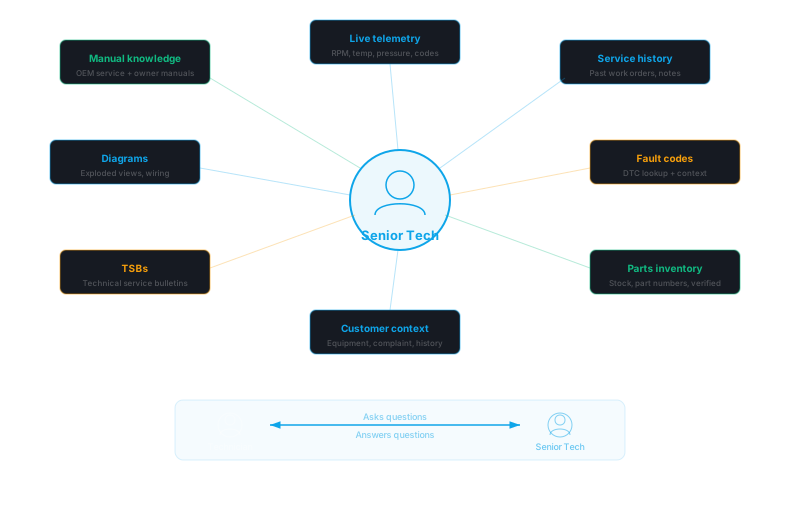
Three surfaces
- API — The product. Returns typed JSON: procedures, safety warnings (ANSI Z535), specifications, parts lists, citations, confidence scores, and field intelligence. Any system can consume it.
- Technician frontend — A reference PWA that renders the full workflow: queue, assess, repair, verify, close. Streaming responses, chat, contextual widgets, and shop-floor optimizations (large touch targets, high contrast, text scaling).
- Backoffice — The control center for OEM content teams, dealer service managers, and network administrators. Document management, evaluation, network analytics, adoption tracking, and tenant configuration.
How it works

Each query passes through a multi-stage intelligence pipeline. The main stages:
- Intent classification — determines what the tech is asking. Acknowledgments exit immediately. Follow-ups route through context-aware rewriting.
- Ontology expansion — bridges vocabulary gaps between how techs ask and how manuals are written. Expands symptoms to probable causes using the tenant's domain ontology.
- Hybrid retrieval — semantic search + keyword matching + neural relevance re-ranking + cross-reference resolution + compliance enrichment, all in parallel.
- Confidence evaluation — if retrieval quality is low, triggers agentic recovery: query reformulation, broadened search, section discovery. The system tries harder before giving a low-confidence answer.
- Structured generation — produces typed JSON using role-specific prompts and up to 8 context streams: documentation, compliance standards, fault codes, customer history, parts inventory, service history, TSBs, and diagrams.
- Safety validation — 4-check pipeline: warning enforcement, grounding verification, range validation, confidence scoring. Every spec value traced to its source.
Each query is also enriched with 8 context streams — step notes, fault codes, customer history, feedback, parts inventory, service history, TSBs, and diagram context — so the system reasons about the full picture, not just the manual text.
Field intelligence loop
The retrieval pipeline is the foundation. The field intelligence loop is what makes the system worth deploying.
When a technician completes a repair, the platform captures the outcome at every step — what was done, whether it resolved the issue, what the tech observed. When a repair doesn't work, the platform captures what actually fixed it.
That outcome data feeds a continuous learning cycle:
- Corrections submitted by technicians go through a validation workflow (submitted, validated, active) before they influence future responses
- Diagnostic templates that consistently lead to correct diagnoses are promoted; templates that don't are deprioritized
- Network-wide patterns surface across the dealer base — if 3 dealers report the same alternative fix for a known issue, the platform proposes a correction for admin review
- Resolution analytics tell the OEM what actually works in the field, not just what the manual says should work
After thousands of repairs across a dealer network, the knowledge base contains field-validated intelligence that doesn't exist in any manual. See Field Intelligence for the full architecture.
OEM-to-dealer distribution
Traditional knowledge distribution: OEM publishes PDF, emails it to dealers, hopes someone reads it. TSBs sit in filing cabinets. Updated procedures never reach the techs who need them.
With Planara: OEM publishes content through the platform. Every dealer namespace in the network has it immediately — chunked, indexed, and ready for retrieval. The backoffice shows the OEM which dealers are using the content, which techs are struggling, and where documentation gaps exist across the network.
The OEM is the customer. The dealers are the users. The content flows down. The intelligence flows up.
Key capabilities
| Capability | What it does |
|---|---|
| Structured responses | Typed procedures, safety warnings, specs, parts — not prose. Every field has a schema. |
| Citations | Every claim maps to a source document, page, and chunk. Inline [n] markers link to page images. |
| Safety-first | ANSI Z535 severity classification. Safety warnings surface before procedures. CKL enrichment adds industry standards. |
| Confidence scoring | Three-tier display (verified, check source, low confidence) with progressive disclosure from badge to full evidence. |
| Field intelligence | Step-level outcome tracking, correction workflows, diagnostic template learning, network resolution analytics. |
| Multi-tenant | Namespace-isolated data, roles, documents, and configuration. OEM-level network visibility across dealer tenants. |
| Role-aware | Technician, owner, and admin roles see different content. Role determines document visibility, escalation paths, and response detail. |
| Equipment-centric | Retrieval scoped to the specific equipment model. Serial number lookup, variant family expansion, service history integration. |
| Whole-asset altitude | Conceptual questions ("what does this do?") answered from a cited whole-asset overview, not whichever subsystem chunk ranked first. Multi-machine sites use a facility hierarchy that injects one node per turn — context stays O(1) regardless of site size. |
| Context streams | 8 real-time data streams injected into every query for situational awareness. |
| Diagram highlighting | Component-level overlays on manufacturer diagrams during procedure steps. |
| Self-serve onboarding | Upload a PDF, auto-generate a working configuration in under 30 seconds — prompts, ontology, eval queries, diagnostic templates. PDF ingestion takes 10-30 minutes depending on document size. Full path from upload to queryable: ~30-45 minutes. |
| Widget API | Individual endpoints for each data type. Embed a safety widget, a procedure widget, or a parts widget into your existing tools. |
Documentation sections
Getting Started
Provision a tenant, upload your first document, configure roles, and get your first query answered.
Platform Concepts
Architecture, field intelligence, diagnostics, context streams, widget API, integration architecture, equipment scoping, CKL, roles, and evaluation.
Content Management
Document library, ingestion pipeline, compliance knowledge layer configuration.
Quality & Evaluation
Eval management, dashboards, review workflows, automated evaluation.
Monitoring & Analytics
Network dashboard, query analytics, adoption metrics, feedback tracking, observability.
Operations
Dashboard configuration, roles, equipment, fleet management, tenant provisioning, integrations.
Administration
Team management and workspace settings.