Field Intelligence
How Planara learns from every repair — step-level outcome tracking, correction workflows, network resolution analytics, and diagnostic template learning.
The problem
Equipment manufacturer documentation tells you what should work. It doesn't tell you what actually works in the field.
The senior tech who's been at the shop for 20 years knows that when the manual says "replace the thermostat," you should also check the tell-tale water passage — because 60% of the time, that's the actual root cause. That knowledge isn't in any manual. It's in the tech's head. And when that tech retires, the knowledge walks out with them.
Planara captures that knowledge at scale.
The loop
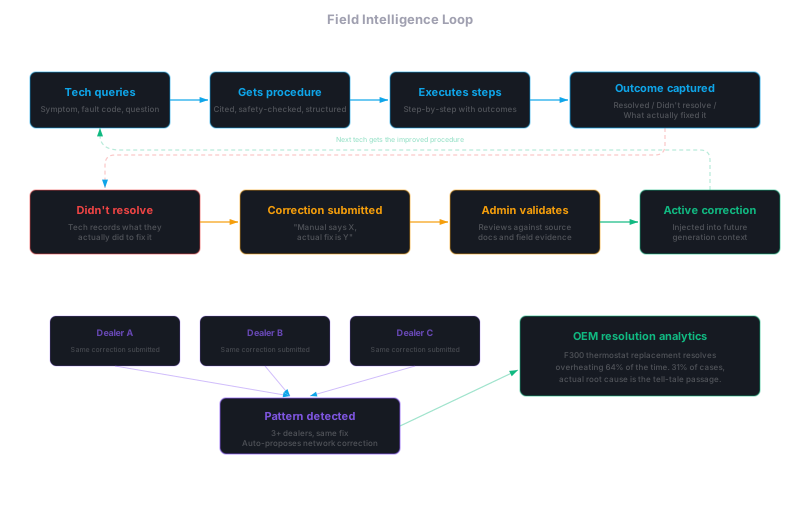
Every repair that runs through Planara generates structured outcome data:
Query → Structured Procedure → Tech Executes →
  Step-level outcome (completed / didn't resolve / skipped) →
    If didn't resolve: What actually fixed it? →
      Correction enters knowledge base →
        Next tech gets the improved procedure
This isn't a feedback button. The outcome data is captured as part of the repair workflow, not bolted on after the fact.
Step-level outcome tracking
Each procedure step has three possible outcomes:
- Completed — the tech performed the step successfully
- Didn't resolve — the tech performed the step, but it didn't fix the problem
- Skipped — the step wasn't applicable to this specific situation
When a step is marked "didn't resolve," the platform captures what the tech observed and what they did instead. This observation is attached to the step, the equipment model, and the diagnostic context.
Correction workflow
Technician corrections follow a lifecycle:
| State | Who acts | What happens |
|---|---|---|
| Submitted | Technician | Tech submits a correction during or after a repair — "the manual says X, but the actual fix is Y" |
| Validated | Admin | Service manager reviews the correction against the source documentation and field evidence |
| Active | System | The correction is injected into generation context for future queries that match the same diagnostic pattern |
Only active corrections influence responses. Admins can deactivate corrections that turn out to be wrong or situation-specific. The full correction history is preserved for audit.
Network-wide pattern detection
When multiple technicians across different dealerships submit the same correction or report the same step-level outcome, the platform detects the pattern:
- 3+ matching corrections from different dealers auto-generate a correction proposal for admin review
- Recurring "didn't resolve" outcomes on a specific step trigger a documentation gap alert
- Consistent alternative procedures that resolve issues more frequently than the documented procedure are flagged as potential manual updates
This runs across the dealer network — not just within a single shop. The OEM sees resolution intelligence that would take months of field engineering to surface on its own.
Resolution analytics
The Adoption Dashboard and the backoffice analytics surface resolution data at three levels:
Dealer level
- First-time fix rate per technician, per equipment model
- Average resolution time by repair category
- Most common corrections submitted
- Procedure steps with highest "didn't resolve" rate
Network level (OEM view)
- Cross-dealer resolution patterns — which procedures work consistently vs. which have high variance
- Equipment models with the highest multi-attempt repair rate
- Documentation gaps ranked by query volume and negative outcomes
- Field issue detection: spike in queries about the same symptom across multiple dealers = early warning
Equipment level
- Per-model resolution history — what fixes have been applied, what worked, what didn't
- Service history integration — previous repairs on this specific unit inform current diagnosis
- Maintenance compliance — what's been done vs. what's due based on hours and intervals
Diagnostic template learning
Diagnostic decision trees are extracted automatically from documentation during onboarding. They guide technicians through systematic root cause analysis and get better over time:
- Templates that consistently lead to correct diagnoses are promoted in ranking and shown first for matching symptoms
- Templates that lead to incorrect or incomplete diagnoses are deprioritized and flagged for review
- New diagnostic paths discovered in the field — when techs consistently find root causes through a path not in the template, the platform proposes a template update
Template performance metrics (success rate, usage count, average resolution time) are visible in the backoffice. Admins can override automatic prioritization.
How corrections enter responses
When a query matches the diagnostic context of an active correction, that correction gets injected into the generation context alongside the source documentation:
- The retrieval pipeline returns content from the original documentation
- Active corrections matching the equipment model and repair category are loaded
- Both are provided to the generation model with explicit labels:
[Documentation]and[Field Correction] - The response integrates both sources, with citations distinguishing between OEM documentation and field-validated corrections
- The confidence tier reflects the correction's validation state — field corrections from validated sources increase confidence, not decrease it
Privacy and control
- Corrections are scoped to the namespace (tenant) that created them — a correction from Dealer A does not appear in Dealer B's responses unless the OEM promotes it to network-wide
- OEM administrators can promote dealer-level corrections to network-wide status after validation
- Step-level outcome data is aggregated for analytics — individual technician identifiers are available to their dealer admin but anonymized in network-level views
- Correction history is immutable for audit — deactivated corrections are retained with the deactivation reason
Related
- Platform Overview — high-level architecture
- Diagnostics — diagnostic workflow and multi-attempt repairs
- Adoption Dashboard — where resolution analytics surface
- Feedback — individual feedback entries and review workflows
Whole-Asset Overview
How Planara answers "what is this thing?" at the right altitude — a cited orientation of the whole asset, and a facility hierarchy that stays O(1) in context no matter how many machines there are.
Diagnostics
How the platform adapts its diagnostic workflow based on available evidence — from direct-to-repair to full guided investigation.