Platform Overview
Planara is an API-first field intelligence platform. OEM documentation in, structured cited responses out, field learning back in.
What makes Planara different
Every equipment service AI platform retrieves documentation. Planara does three things the others don't.
1. OEM-to-dealer knowledge distribution
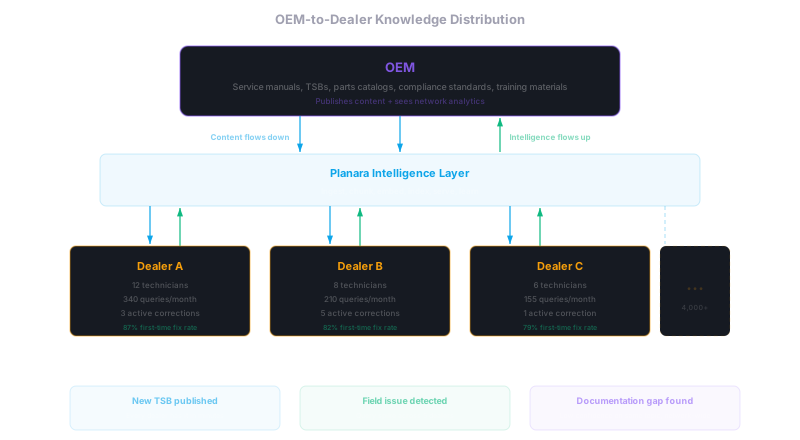
The OEM provisions Planara for their dealer network. Content flows down through a structured pipeline — not email attachments, not PDFs in a shared drive, but indexed, retrievable, safety-classified knowledge available to every technician in every dealership.
When a new TSB is published, every dealer namespace in the network has it within minutes. When a procedure is updated, the old version is superseded. The OEM sees adoption metrics across the network — which dealers are using the content, which techs are struggling, where documentation gaps exist.
This is a distribution layer, not a single-tenant enterprise deployment. The manufacturer is the customer; the service network is the user base. One provisioning decision at the OEM propagates to every dealer namespace, rather than requiring a separate implementation project per site.
2. Closed-loop field intelligence
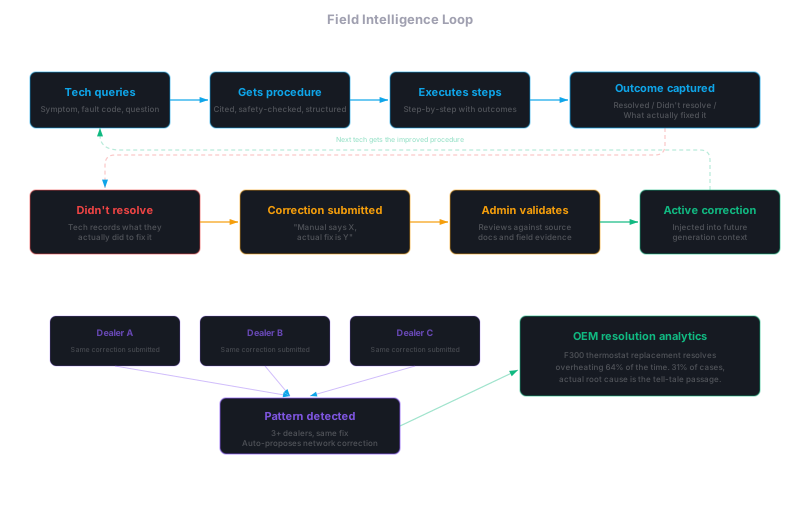
The platform captures what happens after the answer. Step-level outcome tracking records what the technician did, whether it worked, and what they observed. When a procedure doesn't resolve the issue, the platform captures what actually fixed it.
This outcome data feeds a continuous learning cycle:
- Technician corrections flow through submitted > validated > active states before influencing future responses
- Diagnostic templates that lead to correct diagnoses are promoted; failing templates are deprioritized and flagged for review
- Network-wide resolution patterns surface across the dealer base — recurring alternative fixes auto-generate correction proposals for admin review
- The OEM gets field resolution analytics: what actually works across the network, where the manual disagrees with reality
After thousands of repairs, the knowledge base contains field-validated intelligence that isn't in any manual. See Field Intelligence for the full architecture.
3. Equipment-centric context
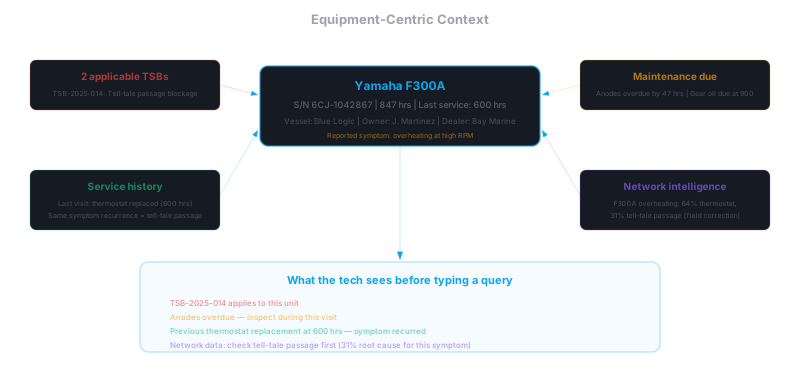
The query isn't "how do I fix overheating." The query is implicit in the equipment.
When a technician selects a work order or scans a serial number, Planara scopes everything to that specific unit: applicable TSBs for this model year, maintenance due based on hours, known issues for this production batch, previous service history at this dealership. The tech hasn't typed anything yet. The system is already working.
Every retrieval call, every cache key, every confidence score is scoped to the equipment model. The same question for two different models returns two different answers — because different models have different specs, different procedures, and different known issues.
See Equipment Scoping for how this works at the data layer.
API-first architecture
Planara is an intelligence platform. The product is the API. The technician frontend is a reference implementation. The backoffice is a management interface.
Any consumer can build on the API directly. Every response is structured JSON — typed procedures, safety warnings with ANSI Z535 severity, cited specifications, parts lists, confidence scoring, and field intelligence annotations. How that data is rendered is up to the consumer.

Each layer only talks to the layer directly below it. The API layer never touches the vector index directly — it invokes the pipeline. The frontend never talks to the database for query data — it calls the API.
Intelligence pipeline
The pipeline is a multi-stage process with conditional routing. At a high level:
- Intent classification — determines what the technician is asking. Acknowledgments and navigation commands exit immediately. Follow-ups route through context-aware rewriting.
- Query confidence scoring — evaluates query specificity using the tenant's component vocabulary. Underspecified queries trigger smart clarification with ontology-informed follow-up questions.
- Query rewriting — uses conversation history to turn follow-ups ("What about the drain plug?") into standalone queries. Multi-query generation creates 3 diverse search variants for short follow-ups.
- Orchestration — classifies the response strategy (diagram, spec_lookup, procedure, explanation, comparison, clarify, default) and configures generation parameters.
- Context gate — for follow-ups, checks whether the answer exists in the current conversation. Hits skip retrieval entirely (around 150ms instead of 15+ seconds).
- Ontology expansion — bridges vocabulary gaps between how techs ask and how manuals are written. Expands symptoms to probable causes using tenant-specific failure-mode mappings.
- Cache check — two layers: response cache (full pipeline skip, under 500ms) and retrieval cache (skip search, proceed to generation with cached source passages).
- Hybrid retrieval — hybrid keyword + semantic search followed by neural relevance re-ranking, linked passage expansion, cross-reference resolution, and CKL enrichment in parallel. Equipment model filtering with variant family expansion.
- Confidence evaluation — if retrieval quality is low, triggers query expansion for a second retrieval attempt. If still low, runs multi-strategy recovery: reformulate, broaden, section discovery.
- Skill routing — classifies the query into a skill bucket (procedural, diagnostic, spec, parts, safety, general) and applies skill-specific guidance and content-type score boosts.
- Generation — the managed LLM produces structured JSON using role-specific instructions and up to 8 context streams. Simple queries route to a fast path (around 3s); complex queries use a higher-capability path (8-12s). Parallel generation for multi-section spec queries.
- Self-evaluation — checks generation output against the retrieved source passages for factual consistency, citation accuracy, and completeness before validation.
- Proactive suggestions — generates follow-up questions, procedure candidates, and related topics based on the response and conversation context.
- Validation — 4 safety checks: warning enforcer (inject omitted safety warnings), grounding check (verify every spec value against the source documentation), range validator (flag implausible values), confidence scorer. Retries once with stricter guidance on failure.
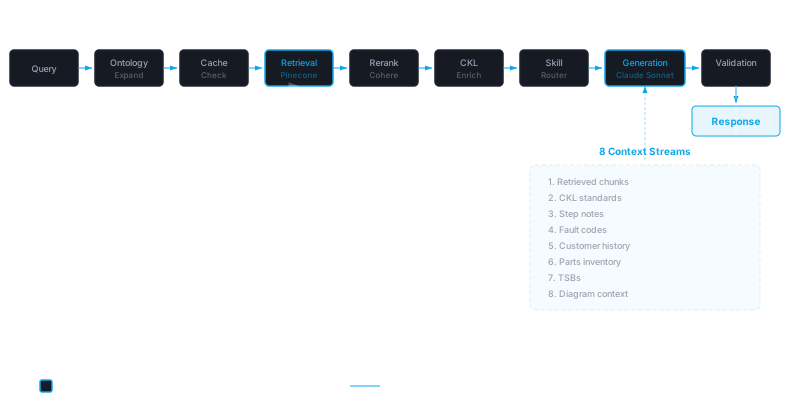
Conditional exits: acknowledgments exit after intent classification. Context gate hits exit after generation from history. Cache hits exit after cache check. Zero-result retrieval exits with a structured error response.
Diagnostic workflow
The diagnostic stage adapts to the evidence available:
- High confidence — telemetry and fault codes converge on a single root cause. Skip diagnosis, go directly to repair procedure with safety warnings and parts list.
- Ambiguous — multiple possible causes. Guided investigation: targeted checks prioritized by diagnostic value, confidence updates as findings come in, adaptive path as branches are eliminated.
- Symptom-only — no telemetry or fault codes. Full diagnostic tree from reported symptom through systematic elimination.
During diagnosis, each finding is recorded, confidence is recalculated, and the next check adapts. When confidence crosses the confirmation threshold, the platform transitions to repair with the confirmed root cause, supporting evidence, and a complete diagnostic record.
Multi-attempt repairs are first-class: when verification fails, the tech starts a new attempt without losing history. Previous attempts inform subsequent diagnostic recommendations. On close, a multi-attempt correction summary is auto-generated for warranty and fleet analytics.
See Diagnostics for the full diagnostic architecture.
Conversational intelligence
The chat interface applies specific rules for context-aware conversation in shop-floor conditions:
- Short reply understanding — "yes", "done", "185 degrees" are interpreted as answers to the previous question, not new queries
- Workshop idiom awareness — "tap" is distinguished between UI and mechanical context; "check" between diagnostic and visual inspection
- Topic coherence — the primary diagnosis is maintained across multiple symptom reports within a session. New symptoms integrate into the existing picture.
- Follow-up brevity — short follow-ups get concise answers. No re-explaining established context.
- Contextual safety — warnings match the technician's actual situation, not generic boilerplate
See Conversation Intelligence for the full conversational architecture.
Structured response cards
Responses are rendered as typed cards, not raw text:
- Safety cards — DANGER and WARNING alerts, always first when present
- Candidates cards — ranked repair options with confidence indicators
- Procedure cards — compact inline steps that expand for full detail
- Spec cards — key-value pairs with monospace values
- Parts cards — part numbers with quantities, availability, and bin locations
- Diagram cards — page thumbnails with tap-to-fullscreen
- Industry standard cards — referenced compliance standards with citations
- Sources cards — collapsed citation footer with all referenced documentation
Maximum three content cards per response to prevent overload. Safety always first. Citations always last.
Three ways to consume
1. Reference frontend
Use the technician web app out of the box. Full stage-based workflow (queue, assess, repair, verify, close), streaming responses, chat, contextual widgets, shop-floor optimizations. Deploy it to your hosting of choice and point it at your API.
2. Custom frontend
Build your own UI consuming the Widget API directly. Each widget endpoint returns a typed JSON slice — procedures, safety, parts, specs, citations — that you render however you want.
3. Embedded widgets
Embed individual Planara widgets into existing tools — your DMS, service portal, or field app. A single script tag and a session ID is all you need.
Multi-tenant isolation
Every data boundary uses the namespace (tenant slug) as the isolation key:
| System | Isolation mechanism |
|---|---|
| Vector index | Separate namespace per tenant |
| Compliance index | Separate namespace per tenant |
| Database | Row-level access control scoped to the tenant namespace |
| Retrieval cache | Namespace included in every cache key |
| API requests | Namespace required on every query, enforced by API key scope |
| File storage | Per-namespace storage prefix |
| Keyword search vocabulary | Per-namespace vocabulary computation |
OEM administrators have cross-namespace visibility for network-level analytics and content management while maintaining strict data isolation between dealer tenants.
Confidence tiers
Every response includes a confidence tier that communicates sourcing quality through progressive disclosure — badge, popover, full evidence.
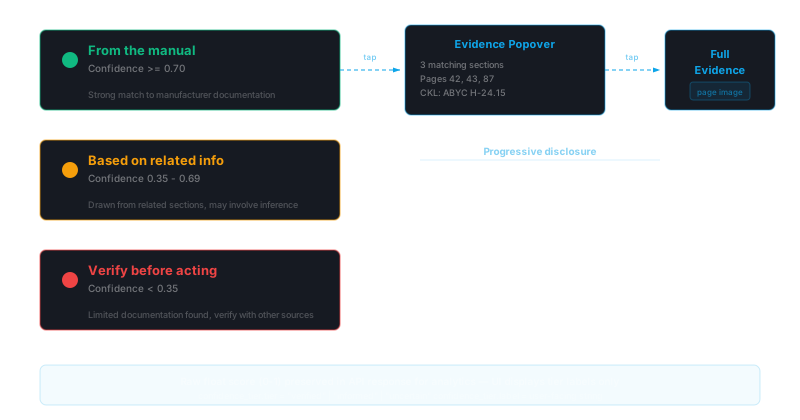
- Verified — high retrieval relevance, all claims grounded in source documentation, spec values cross-checked
- Check source — good retrieval but some claims may require manual verification, source citations provided
- Low confidence — limited retrieval coverage or grounding gaps, explicit recommendation to consult the physical manual
Honest limits
Confidence tiers grade the answers the platform can give. Two cases where it deliberately doesn't give one:
- Knowledge gaps — when the documentation doesn't cover the question, the response says so plainly instead of dressing up a non-answer: it keeps what was understood, offers the closest related documented information, and ends with a concrete next step (for example, contacting the dealer or distributor with the unit serial number). It never guesses, and a bare restatement of the question is never served as the answer.
- Ambiguity — when a question could apply to more than one system or machine and the answers would differ, the platform returns a typed clarification question with selectable options rather than a confident answer for the wrong unit.
Both cases are typed distinctly in the API response (knowledge_gap and needs_clarification) so any consumer can render them for what they are.
Tenant provisioning
New tenants are created through a single provisioning action — backoffice UI, CLI, or API. Provisioning creates the namespace, database records, response configuration, domain ontology, and optional demo data.
After provisioning, the auto-onboarding pipeline builds a complete working configuration from a single PDF in under 30 seconds: response templates, maintenance ontology, part number patterns, domain synonyms, CKL triggers, eval queries, fault code lookups, and diagnostic decision trees.
See Tenant Provisioning and Customer Onboarding for the full provisioning and configuration workflow.
Related
- Whole-Asset Overview — answering at the right altitude, and facility-scale hierarchy
- Field Intelligence — closed-loop learning from repair outcomes
- Diagnostics — adaptive diagnostic workflow
- Widget API — endpoint catalog and response shapes
- Dashboard Configuration — widget and stage layout configuration
- Integrations — connecting DMS, telemetry, and ERP systems
Customer Onboarding Guide
The complete playbook for deploying Planara — from single-dealer setup to OEM network rollout.
Whole-Asset Overview
How Planara answers "what is this thing?" at the right altitude — a cited orientation of the whole asset, and a facility hierarchy that stays O(1) in context no matter how many machines there are.