Widget API
Widget endpoints project typed slices of query responses for embedding in custom frontends and external tools.
What widget endpoints are
Widget endpoints return typed slices of a Planara query response. Instead of consuming the full QueryResponse object (which contains procedures, parts, safety warnings, specs, citations, and more), a consumer can request just the data it needs for a specific widget.
This matters because the product is the API. The reference frontend (frontend-v2) is one consumer. A customer's existing DMS, field app, or service portal is another. Widget endpoints let any consumer embed individual Planara capabilities without parsing the full response.
How they work
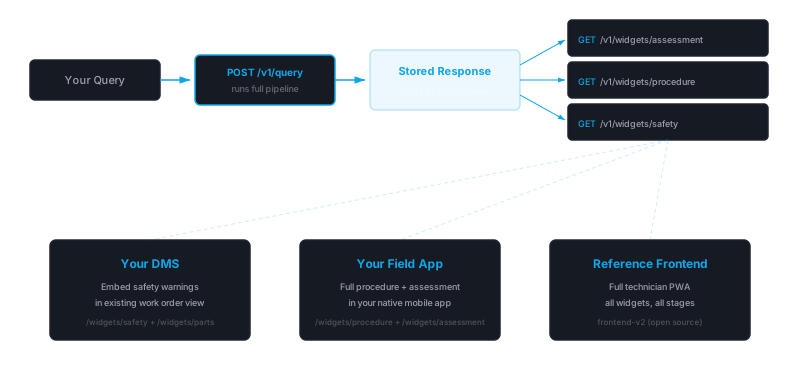
Widget endpoints are a projection layer on top of the core query pipeline. The flow is:
- Query first -- call
POST /v1/query(or/v1/query/stream) with asession_id. The pipeline runs: retrieval, CKL enrichment, generation, validation. The full response is stored server-side (24h TTL). - Project via widget endpoints -- call
GET /v1/widgets/{namespace}/{widget}?session_id={id}to retrieve a typed slice of that stored response.
Widget endpoints do not re-run the pipeline. They read from the stored response and return the relevant fields. This makes them fast (sub-50ms) and safe to call multiple times.
For integration-derived widgets (queue, telemetry), no prior query is needed -- these endpoints dispatch directly to the configured data source.
Quick start
Interactive API docs
The API auto-generates an OpenAPI specification. Use these to explore endpoints, inspect request/response schemas, and test calls directly from the browser:
- Swagger UI: your-api-domain.planara.com/docs
- ReDoc: your-api-domain.planara.com/redoc
- Raw OpenAPI spec: your-api-domain.planara.com/openapi.json
Minimal example
Three calls to go from question to rendered widgets:
Step 1 -- Submit a query
const sessionId = crypto.randomUUID();

const queryRes = await fetch("https://your-api-domain.planara.com/v1/query", {
  method: "POST",
  headers: { "Content-Type": "application/json" },
  body: JSON.stringify({
    query: "How do I change the oil on this engine?",
    role: "technician",
    namespace: "your-namespace",
    session_id: sessionId,
  }),
});

const queryData = await queryRes.json();
// queryData contains the full QueryResponse -- but you don't need to parse it all.
Step 2 -- Get the assessment widget
const assessmentRes = await fetch(
  `https://your-api-domain.planara.com/v1/widgets/your-namespace/assessment?session_id=${sessionId}`
);
const assessment = await assessmentRes.json();
// { summary, confidence, confidence_badge, confidence_tier, query_type, active_skill, specifications }
Step 3 -- Get procedure steps
const procedureRes = await fetch(
  `https://your-api-domain.planara.com/v1/widgets/your-namespace/procedure?session_id=${sessionId}`
);
const procedure = await procedureRes.json();
// { procedures[], safety_warnings[] }
Widget endpoints are projections of the stored query response -- they return instantly (sub-50ms) and can be called independently or in parallel.
Streaming example
For chat UX, use the SSE stream endpoint to show progress and stream text as it generates:
const res = await fetch("https://your-api-domain.planara.com/v1/query/stream", {
  method: "POST",
  headers: { "Content-Type": "application/json" },
  body: JSON.stringify({
    query: "What are the torque specs for the cylinder head?",
    role: "technician",
    namespace: "your-namespace",
    session_id: crypto.randomUUID(),
  }),
});

const reader = res.body.getReader();
const decoder = new TextDecoder();
let buffer = "";

while (true) {
  const { done, value } = await reader.read();
  if (done) break;

  buffer += decoder.decode(value, { stream: true });
  const lines = buffer.split("\n");
  buffer = lines.pop(); // keep incomplete line in buffer

  for (const line of lines) {
    if (!line.startsWith("data: ")) continue;
    const event = JSON.parse(line.slice(6));

    switch (event.type) {
      case "thinking":
        // Pipeline started -- show a spinner
        break;
      case "retrieved":
        // Source content retrieved -- you can preview citations before generation finishes
        break;
      case "generating":
        // Answer generation started
        break;
      case "summary_token":
        // Partial summary text -- append to chat bubble for real-time typing effect
        appendToChat(event.token);
        break;
      case "complete":
        // Full structured response -- same shape as POST /v1/query response
        renderWidgets(event.data);
        break;
    }
  }
}
The summary_token events give you readable text as the answer is generated -- useful for a chat-style UX where users see the answer appear incrementally. The complete event delivers the full structured response with procedures, parts, citations, and everything else.
Page images
Citations reference specific pages from the source manuals. Render them with the page image endpoint:
// Thumbnail (300px wide, fast)
const thumbUrl = `https://your-api-domain.planara.com/v1/pages/your_doc_id/42`;

// Full resolution (original scan quality)
const fullUrl = `https://your-api-domain.planara.com/v1/pages/your_doc_id/42?quality=full`;
These are the original manual pages -- not AI-generated content. Use them alongside citations so technicians can verify information against the source material.
The page_images array in the citations widget response gives you the paths directly:
const citations = await citationsRes.json();
// citations.page_images = ["/v1/pages/your_doc_id/42", "/v1/pages/your_doc_id/43"]
Authentication
The API supports per-tenant API keys:
- Keys are scoped per namespace -- a key for
tenant-acannot accesstenant-b. The key's namespace overrides whatever namespace the request body specifies. - Keys are passed via the
Authorization: Bearer <key>header. - Keys are generated and revoked in the backoffice, under the tenant's API keys page.
Whether unauthenticated requests are accepted is a per-deployment setting. Deployments serving real customer data require a key on every query; demo and evaluation deployments may run open with rate limiting. If a request is rejected with 401, include your API key in the Authorization header. Endpoint URLs and response shapes are identical with or without authentication.
Endpoint catalog
Intelligence-derived widgets
These project from a stored query response. All require session_id as a query parameter.
| Endpoint | Returns | Fields |
|---|---|---|
GET /v1/widgets/{ns}/assessment | AI assessment | summary, confidence, confidence_tier, query_type, active_skill, specifications |
GET /v1/widgets/{ns}/procedure | Procedure steps | procedures[], safety_warnings[] |
GET /v1/widgets/{ns}/safety | Safety warnings | safety_warnings[] |
GET /v1/widgets/{ns}/parts | Parts list | parts[] |
GET /v1/widgets/{ns}/specifications | Specifications | specifications{} |
GET /v1/widgets/{ns}/citations | Citations | citations[], citation_map[], page_images[] |
Integration-derived widgets
These dispatch to the configured data source (mock, integration, or none). No session_id required.
| Endpoint | Returns | Data source |
|---|---|---|
GET /v1/widgets/{ns}/queue | Work order queue | Mock or DMS integration |
GET /v1/widgets/{ns}/telemetry | Engine telemetry | Mock or telematics integration |
Diagram highlight endpoint
In addition to the standard widget projections, the API provides a diagram highlighting endpoint:
| Endpoint | Returns | Fields |
|---|---|---|
GET /v1/diagrams/{ns}/{doc_id}/{page}/highlight | Highlighted diagram image | PNG bytes with component bounding boxes drawn on the original page image |
Query parameters:
| Parameter | Description |
|---|---|
components | Comma-separated component names to highlight (e.g., thermostat,water pump) |
quality | thumb (default, 300px wide) or full (original resolution) |
The highlight endpoint reads pre-computed diagram analysis data (generated by the diagram analysis preprocessing step) and draws semi-transparent bounding boxes around matching components. If no analysis exists for the page, or no components match, the original page image is returned as a fallback.
This endpoint is used by the technician frontend's procedure widget -- when a procedure step references a component that has been analyzed, the diagram appears with the relevant part highlighted in sky blue. See Diagram Highlighting for the full workflow.
Response shapes
Assessment
{
  "summary": "This engine requires 7.4 quarts of manufacturer-recommended oil...",
  "confidence": 0.85,
  "confidence_badge": "verified",
  "confidence_tier": {
    "tier": "verified",
    "label": "From the manual",
    "description": "Answer sourced directly from manufacturer documentation"
  },
  "query_type": "procedural",
  "active_skill": "maintenance",
  "specifications": {
    "Oil Capacity": "7.4 quarts (7.0 L)",
    "Oil Type": "10W-30 (manufacturer recommended)"
  }
}
Confidence tier
Every response includes a confidence_tier object with a qualitative assessment of sourcing quality. Use this instead of the raw confidence float for user-facing display.
| Tier | Label | Internal score | Meaning |
|---|---|---|---|
verified | "From the manual" | >= 0.70 | Strong match to manufacturer documentation. Fully grounded and cited. |
informed | "Based on related info" | 0.35 -- 0.69 | Drawn from related sections. May involve inference across multiple sources. |
uncertain | "Verify before acting" | < 0.35 | Limited documentation found. Answer should be verified with additional sources. |
The raw confidence float (0--1) and legacy confidence_badge string are still included for backward compatibility and internal analytics. For tech-facing UI, use confidence_tier.label and confidence_tier.tier to drive display.
Procedure
{
  "procedures": [
    {
      "step": 1,
      "action": "Remove the oil drain plug and drain the oil completely.",
      "detail": "Place a drain pan beneath the engine...",
      "safety_refs": [0],
      "ckl_refs": []
    }
  ],
  "safety_warnings": [
    {
      "index": 0,
      "severity": "WARNING",
      "text": "Engine oil is hot. Allow engine to cool before draining.",
      "source": "your_doc_id",
      "page": 42
    }
  ]
}
Safety
{
  "safety_warnings": [
    {
      "index": 0,
      "severity": "DANGER",
      "text": "Disconnect the battery before performing electrical work.",
      "source": "your_doc_id",
      "page": 15
    }
  ]
}
Parts
{
  "parts": [
    {
      "name": "Oil Filter",
      "part_number": "PART-13440-04",
      "quantity": 1,
      "verified": true
    }
  ]
}
Specifications
{
  "specifications": {
    "Spark Plug Gap": "0.9-1.0 mm (0.035-0.039 in)",
    "Ignition Timing": "BTDC 0° at 1000 rpm"
  }
}
Citations
{
  "citations": [
    {
      "source": "your_doc_id",
      "page": 42,
      "section": "Periodic Maintenance",
      "text": "Change engine oil every 100 hours..."
    }
  ],
  "citation_map": [
    { "index": 1, "source": "your_doc_id", "page": 42 }
  ],
  "page_images": ["/v1/pages/your_doc_id/42"]
}
Queue
{
  "jobs": [
    {
      "id": "WO-2024-0042",
      "customer_name": "Bay Marine Services",
      "equipment": "Model A",
      "complaint": "Engine overheating at WOT",
      "status": "in_progress",
      "priority": "high"
    }
  ]
}
Telemetry
{
  "enabled": true,
  "data": {
    "engine_id": "6CF-1042857",
    "events": [
      { "code": "P0217", "description": "Engine Coolant Over Temperature", "timestamp": "2026-03-22T14:30:00Z" }
    ],
    "fields": {
      "rpm": 5200,
      "coolant_temp_f": 185,
      "oil_pressure_psi": 45
    }
  }
}
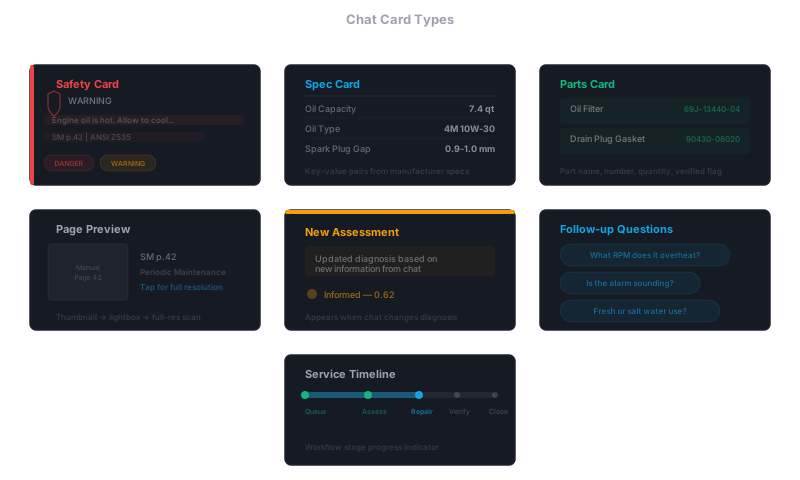
Chat card types
Chat responses compose structured cards inline with text. Each card type renders a specific data slice from the query response.
Intelligence-derived vs integration-derived
The distinction matters for how data flows and how the Dashboard Configuration controls each widget.
Intelligence-derived widgets (assessment, procedure, safety, parts, specifications, citations):
- Data comes from the intelligence pipeline -- AI-generated, structured, cited
- Require a prior
POST /v1/querycall with asession_id - Data source is always
intelligencein the dashboard config - Response is cached for 24 hours
Integration-derived widgets (queue, telemetry):
- Data comes from external systems via the adapter pattern
- Do not require a prior query
- Data source is
mock,integration, ornonein the dashboard config - When set to
integration, the endpoint dispatches to the configured adapter (e.g., Lightspeed for DMS, Siren Marine for telemetry)
Caching behavior
All widget endpoints return Cache-Control: private, max-age=300 headers (5 minutes). This means:
- Browsers and CDNs will cache the response for 5 minutes
- The
privatedirective prevents shared caches (CDNs) from storing responses meant for a specific user - After 5 minutes, the next request will hit the server and read from the stored response
The underlying query responses in the database have a 24-hour TTL. After that, the widget endpoint returns 404 and the consumer must re-query.
Additional request parameters
skip_cache
Pass skip_cache: true on the POST /v1/query request body to bypass the retrieval cache and force a fresh pipeline run. Useful when you've just ingested new documents and want to verify the updated content is being retrieved.
const res = await fetch("https://your-api-domain.planara.com/v1/query", {
  method: "POST",
  headers: { "Content-Type": "application/json" },
  body: JSON.stringify({
    query: "What are the torque specs for the cylinder head?",
    role: "technician",
    namespace: "your-namespace",
    session_id: crypto.randomUUID(),
    skip_cache: true,
  }),
});
Additional response fields
follow_up_questions
Every query response includes a follow_up_questions array -- AI-generated clarifying or next-step questions based on the current response. The technician frontend renders these as tappable chips below the chat response.
{
  "follow_up_questions": [
    "What torque wrench setting should I use?",
    "Do I need to replace the gasket when re-torquing?",
    "What is the re-torque interval after break-in?"
  ]
}
Use these to drive conversational flow. Each follow-up can be submitted as a new query with the same session_id to maintain conversation context.
response_type
Every query response carries a response_type discriminator that tells the consumer which rendering mode to use. Most responses are oem_answer — the default, full cited answer. The values a consumer should handle:
| Value | Meaning | Rendering guidance |
|---|---|---|
oem_answer | Full cited answer from the equipment documentation (default) | Standard answer rendering |
ckl_answer | Answer drawn from the industry compliance layer (CKL) rather than the equipment manual | Label as general industry knowledge |
needs_clarification | The question is ambiguous — for example, between two near-identical systems or machines. The response is a question, not an answer | Render the clarification question and options as tappable choices. Never render as an answer card |
knowledge_gap | The documentation does not cover the question. The summary says so explicitly, keeps what was understood, points to the closest documented information, and gives a concrete next step | Suppress procedure, parts, and follow-up chip rendering — do not imply an answer exists |
refusal | Out-of-scope question, declined | Short message, no answer card |
continuation | Continuation of the previous answer, no new retrieval | Inline with the prior answer |
inventory | Listing of the available documentation | Render as a list |
inline_chat | Conversational aside (greeting, small talk) | Plain chat bubble |
ack / navigation | Acknowledgment or UI-navigation response | Minimal or no rendering |
safety_emergency / safety_hazard | Life-safety or hazardous-equipment-state override — safety guidance replaces the normal answer | Render the safety warnings prominently, before anything else |
Two of these are honesty guarantees, enforced server-side: a clarifying question is always typed needs_clarification (never served as a confident oem_answer), and a knowledge_gap response always states the gap plainly rather than restating the question — a bare restatement is never the answer.
clarification
When response_type is needs_clarification, the response includes a clarification object with the question to display and selectable options:
{
  "response_type": "needs_clarification",
  "summary": "Are you asking about the engine-driven pump, or the electric transfer pump?",
  "clarification": {
    "question": "Are you asking about the engine-driven pump, or the electric transfer pump?",
    "options": [
      { "id": "doc-id-a", "label": "Engine-driven pump" },
      { "id": "doc-id-b", "label": "Electric transfer pump" }
    ]
  }
}
Render the options as buttons. Submitting a selection (a new query with the same session_id) re-asks the original question scoped to that system. The option labels are also mirrored into follow_up_questions, so a consumer that only renders follow-up chips still presents the choices. clarification is null on every other response type.
Error handling
| Status | Meaning |
|---|---|
200 | Widget data returned |
404 | No stored response found for this session -- either the session expired (24h TTL) or no query was made |
429 | Rate limited (inherits from global rate limiting) |
500 | Server error |
Related
- Platform Overview -- architecture layers and consumption models
- Dashboard Configuration -- enable/disable widgets, configure data sources
- Integrations -- connect external systems that feed integration-derived widgets