Documents
Manage your uploaded manuals and guides -- the knowledge foundation of Planara.
What this page does
The Documents page lists every PDF that has been uploaded and processed by Planara. Documents are the knowledge foundation -- each uploaded PDF is parsed by multiple AI models, broken into semantic chunks (specs, procedures, safety warnings, diagrams), indexed as vectors, and stored in the search index.
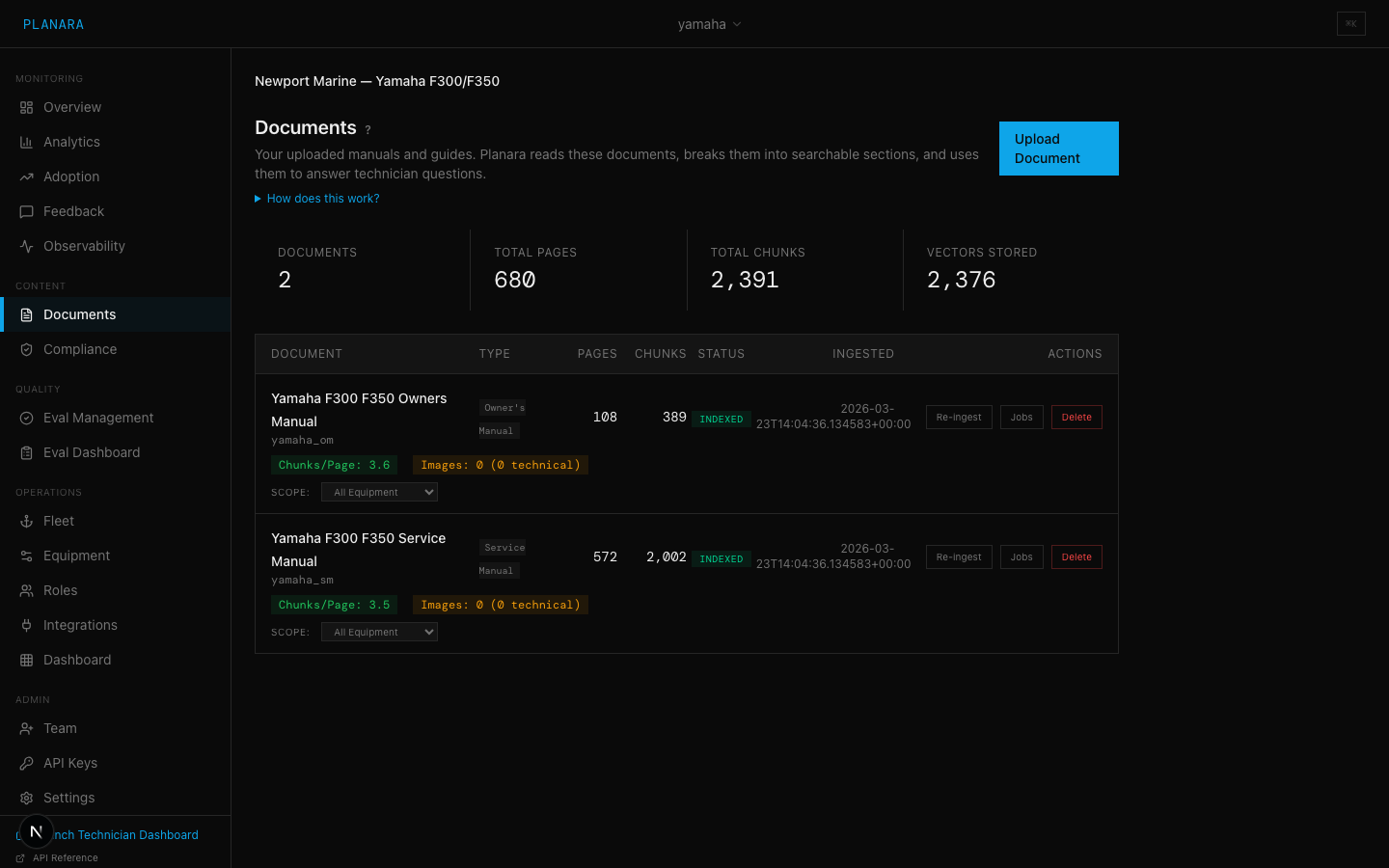
Summary stats
Four metrics across the top:
| Metric | Description |
|---|---|
| Documents | Number of fully indexed documents |
| Total Pages | Sum of all pages across all indexed documents |
| Total Chunks | Sum of all semantic chunks extracted from all documents |
| Vectors Stored | Number of indexed vectors in the search index |
Document list
Each document shows:
| Column | Description |
|---|---|
| Document | Title (clickable -- navigates to document detail) and doc_id (monospace identifier) |
| Pages | Total page count from the original PDF |
| Chunks | Number of semantic chunks extracted |
| Vectors | Number of indexed vectors stored |
| Status | Processing state badge: Indexed (green), Processing (blue), Queued (gray), Failed (red) |
| Ingested | Timestamp of when ingestion completed |
| Actions | Re-ingest, Jobs, Delete buttons |
Quality indicators
Below each completed document, you will see quality badges:
- Chunks/Page -- ratio of chunks to pages. Above 3.0 is good (green), below is a warning (yellow). Low ratios may indicate pages that were not parsed correctly.
- Images -- total images found and how many are technical diagrams. Technical images are indexed for visual retrieval.
- Parsers -- which AI parsers were used during ingestion.
- Parse errors -- number of pages that produced parsing errors. Non-zero counts warrant investigation.
- Quality -- overall quality score as a percentage. 60%+ is green, below is yellow.
Equipment scope
Each document has an equipment scope dropdown with three options:
| Scope | Description |
|---|---|
| All Equipment | Document is available for all queries regardless of equipment context |
| Specific Model | Document is only retrieved when queries relate to the selected equipment type |
| Specific Instance | Document is scoped to a single equipment unit (not commonly used) |
When you narrow a document's scope from "All Equipment" to a specific model, a warning will appear if any eval queries reference that document, since scope changes may affect eval results.
See Equipment Scoping for more detail.
Actions
Upload Document
The "Upload Document" button navigates to the Ingestion page.
Re-ingest
Triggers a full re-parse, re-chunk, and re-index of the document. Use this after:
- Updating the parsing pipeline
- Fixing a document that had parse errors
- Changing chunk settings
Warning: Re-ingestion replaces all existing chunks and vectors for this document. Eval queries referencing this document may produce different results afterward.
Delete
Permanently removes the document, all its chunks, and all indexed vectors. This cannot be undone. A confirmation dialog is shown before deletion.
Jobs
Navigates to the Ingestion page filtered to show jobs for this document.
Scope change warnings
When you change a document's scope from "All Equipment" to "Specific Model", Planara checks whether any eval queries are linked to this document. If so, a yellow warning banner appears listing the affected queries and their text. You can choose to apply the change anyway or cancel.
This is important because scoping a document to a specific model means it will not be retrieved for queries about other models -- which may cause previously-passing eval queries to fail.