Equipment Models
Define equipment types with telemetry fields, service intervals, and alert templates.
What this page does
The Equipment page defines the types (models) of equipment your organization services. Each type can have telemetry fields, service intervals, and alert templates. Individual units (serial numbers, owners, locations) are managed in the Fleet section.
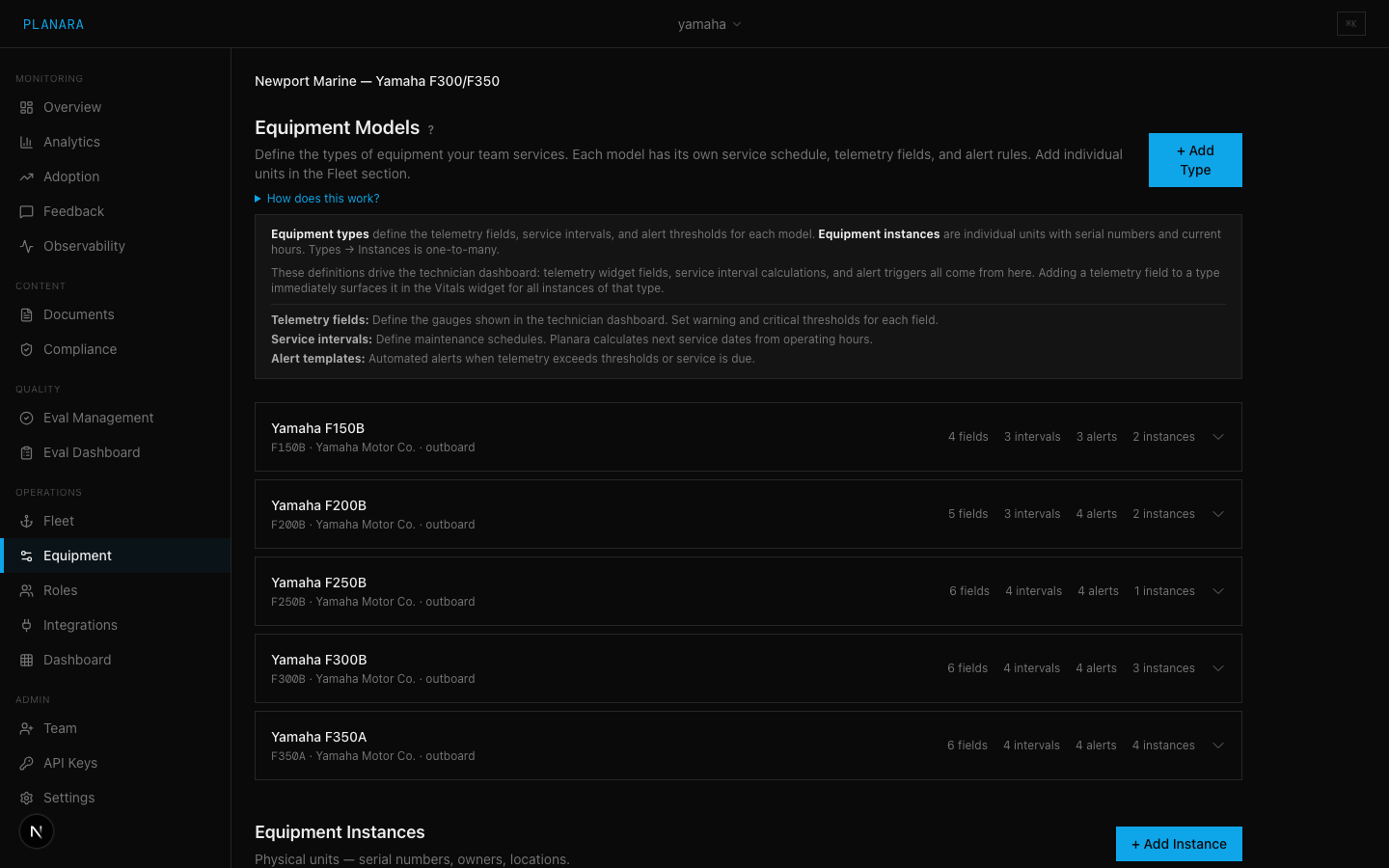
Equipment types vs. instances
| Concept | Example | Managed here? |
|---|---|---|
| Equipment type | "Yamaha F350A Outboard" | Yes |
| Equipment instance | Serial #6CJ-123456, 450 hours, docked at Newport | Partially (instances can be added here, but full fleet view is on the Fleet page) |
Types define the template. Instances are individual units of that type.
Creating an equipment type
Click "+ Add Type" and fill in:
| Field | Description |
|---|---|
| Model ID | Unique identifier (e.g., F350A). Used as a key in scoping and retrieval. |
| Display Name | Human-readable name (e.g., "Yamaha F350A Outboard") |
| Category | Classification: marine, factory, vehicle, hvac, general |
| Manufacturer | Manufacturer name (e.g., "Yamaha") |
Expanded type detail
Click on any equipment type to expand and see/edit its full configuration:
Telemetry fields
Define what data points can be tracked for this equipment type. Each field has:
| Property | Description |
|---|---|
| Key | Machine-readable identifier (e.g., engine_hours, rpm, coolant_temp) |
| Label | Display name (e.g., "Engine Hours", "RPM", "Coolant Temperature") |
| Unit | Measurement unit (e.g., "hours", "rpm", "F") |
| Default Value | Starting value for new instances |
| Warn Low / Warn High | Threshold range. Values outside this range trigger warnings. |
These fields drive the Vitals widget in the technician frontend. Adding a field here immediately makes it available for all instances of this type.
Service intervals
Define recurring maintenance schedules:
| Property | Description |
|---|---|
| Service Type | Name of the service (e.g., "Oil Change", "100-Hour Inspection") |
| Interval Value | Number value (e.g., 100) |
| Interval Unit | Unit of measurement (hours, days, miles, cycles) |
The Fleet page uses these intervals to calculate when each instance is due for service.
Alert templates
Define automated alert rules:
| Property | Description |
|---|---|
| Alert Name | Display name for the alert |
| Trigger Type | What triggers it: service_proximity (approaching service due), threshold (telemetry value out of range), seasonal (time-based) |
| Configuration | Type-specific parameters (proximity hours, threshold values, etc.) |
Equipment instances
Below the types section, you can add individual equipment instances:
| Field | Description |
|---|---|
| Type | Select from your defined equipment types |
| Serial Number | Unique identifier for this unit |
| Nickname | Friendly name (e.g., "Boat 7", "Main Engine") |
| Owner Email | Email of the equipment owner |
| Location | Where the equipment is located (e.g., "Slip 42, Newport Marina") |
| Current Hours | Operating hours reading |
| Current Cycles | Operating cycles count |
| Commission Date | When the equipment was put into service |
| Notes | Free text notes |
Why this matters (and what mis-tagging costs you)
Equipment tags are not metadata for humans. They are a filter the retrieval pipeline applies at query time. Get them wrong and the right document never reaches the answer.
What happens when a tag is right:
A document tagged F300 is auto-expanded at ingest time to the full variant family — [F300, F300A, F300B, FL300A, FL300B] — and every passage carries all five tags. A technician query about an FL300B matches because the passage's tag list contains FL300B. The family map is shared between ingestion and retrieval — adding a new family makes it available to both.
What happens when a tag is wrong:
- Tagged with the wrong model → the doc is excluded from every query about the model it actually covers. It is functionally invisible. Quality score, passage count, ingest status all look fine. The doc just never surfaces.
- Tagged with a model that has no family mapping → it passes through as-is. No family expansion. A query for
F300Awill not match a passage tagged onlyF300. Either tag the document with every variant explicitly or define the family mapping before ingest. - Left untagged → the doc is treated as model-specific to nothing and only appears for queries with no equipment context. For a service manual, this means it never gets retrieved.
Cross-model docs use _global.
Generic shop standards, brand-wide safety bulletins, parts cross-reference tables — anything that applies regardless of model — gets tagged _global. _global docs are always in the candidate pool. Do not use _global for a doc that only covers one model "just to be safe" — it will pollute every query in the namespace.
Check before you ship. After ingestion, run a known-good query for each tagged model and confirm the document shows up in the cited sources. If it doesn't, the tag is wrong, not the query.
How equipment affects retrieval
When a query includes equipment context (model ID, serial number), Planara scopes retrieval to documents tagged for that equipment type. This means:
- Documents with scope "All Equipment" are always included
- Documents with scope "Specific Model" matching the query's equipment type are included
- Documents scoped to other models are excluded
This prevents irrelevant content from appearing in answers. See Equipment Scoping for more detail.