Eval Review
A focused interface for reviewing auto-generated test questions.
What this page does
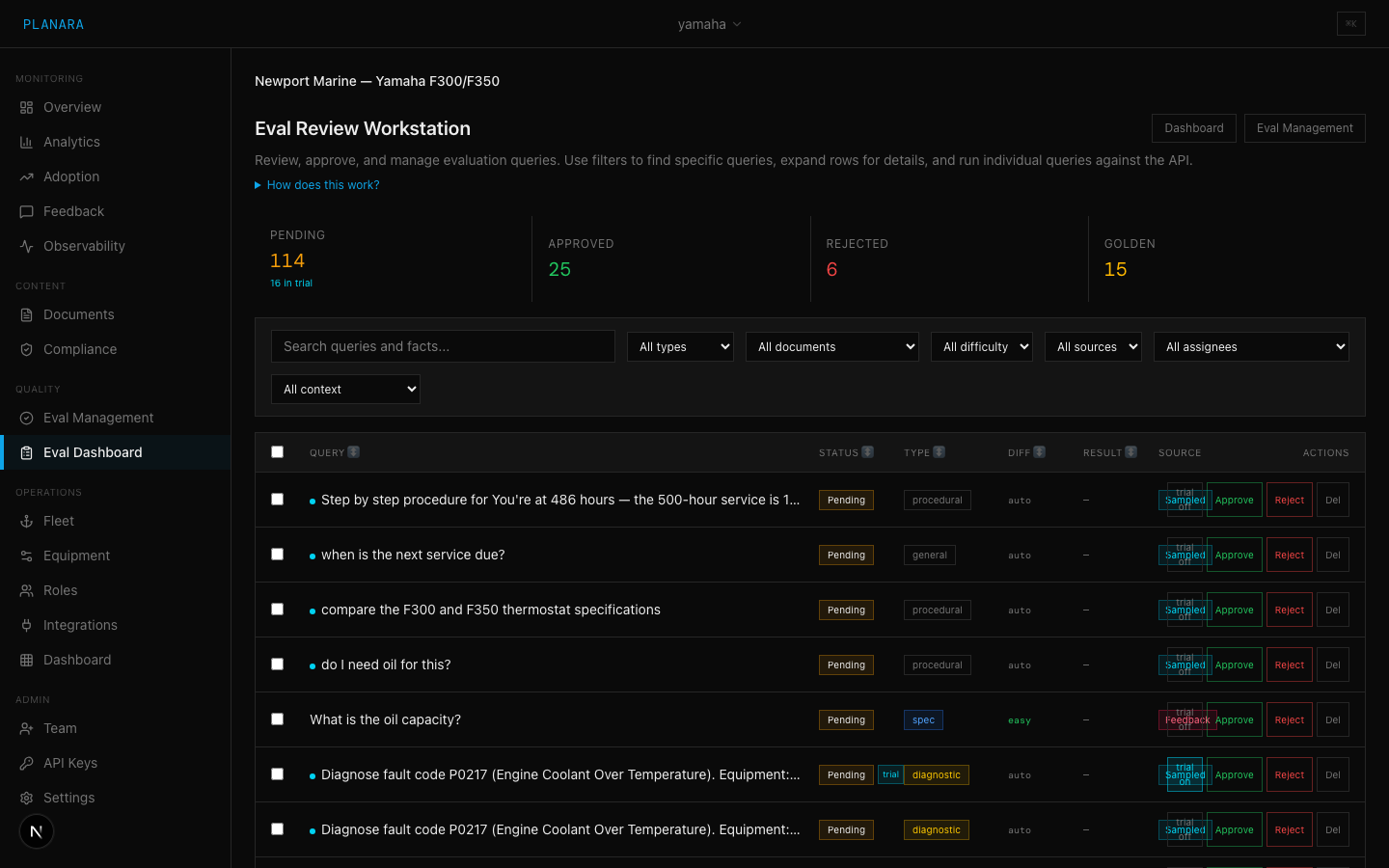
The Eval Review page is a streamlined interface for the review step of the eval workflow. While Eval Management provides the full-featured eval interface, this page focuses specifically on reviewing and curating test questions.
Generate controls
At the top of the page:
- Count -- number of queries to generate (1-50)
- Generate Queries -- triggers AI generation from your ingested documents
Bulk actions
Three bulk action buttons appear contextually:
| Button | When visible | Action |
|---|---|---|
| Approve All Pending | When pending queries exist | Moves all pending to approved |
| Run Approved | When approved queries exist | Runs all approved queries against the live pipeline |
| Promote Passing to Golden | When approved queries have passed | Promotes passing queries to the golden set |
Status summary
Five clickable cards showing counts per status (Pending, Trial, Approved, Rejected, Golden). Click to filter the list. Multiple filters can be active simultaneously.
Run progress
When running queries, a thin progress bar appears below the controls showing completion percentage.
Query list
Each query shows:
- Status badge with color coding and tooltip (Pending, Trial, Approved, Rejected, Golden)
- Query type badge (spec, procedure, safety, troubleshooting, parts) with color coding
- Difficulty level (easy, medium, hard) with color coding
- Source document and page reference
- Last run result (PASS/FAIL) if the query has been evaluated
Inline editing
Click "Edit" on any query to modify:
- Query text -- the test question
- Expected facts -- comma-separated list of facts the answer must contain
Changes are saved immediately to the server.
Per-query actions
| Action | Description |
|---|---|
| Trial | Available for pending queries. Moves to sandbox testing mode. |
| Approve | Available for pending/trial/rejected queries. Marks as valid. |
| Edit | Opens inline editor for query text and expected facts. |
| Reject | Marks as invalid. Will not be included in eval runs. |
| Golden | Available for approved queries that have passed. Promotes to golden set. |
Run results inline
After running, each query shows additional detail:
- Missing facts -- which expected facts were not found (for failures)
- Confidence -- pipeline confidence score as a percentage
- Latency -- response time in seconds
Recommended workflow
- Click "Generate Queries" to create 15-25 queries
- Scan through the list, rejecting any that are clearly bad
- Edit queries where the wording or expected facts need refinement
- Move promising queries to Trial status
- Run a trial eval to see which pass without affecting your official score
- Review trial results -- edit expected facts for near-misses, reject bad queries
- Promote passing trials to Approved (or directly to Golden for critical queries)
- Repeat with more documents until you have 50+ golden queries
Trial as a safety net
The trial step (step 4-6) is optional but strongly recommended for auto-generated queries. It prevents bad expected facts from creating false failures in your official score. A typical batch of 20 auto-generated queries will have 3-5 that need fact corrections -- trial catches these before they matter.
For manually-written queries from domain experts who are confident in the expected facts, you can skip trial and go directly to Approved.